
Download the RockConnect APP onto your Android device.
Make sure you have turned on the RockAIR unit and enabled Bluetooth on your phone.
You will then be able to see the Rockair unit available to connect to in the RockConnect APP.
Connect to this device. If asked for a PIN, it will be 1234 or 4321, depending on the device's age.
Once you are connected, follow these steps:
On this screen, select the advanced option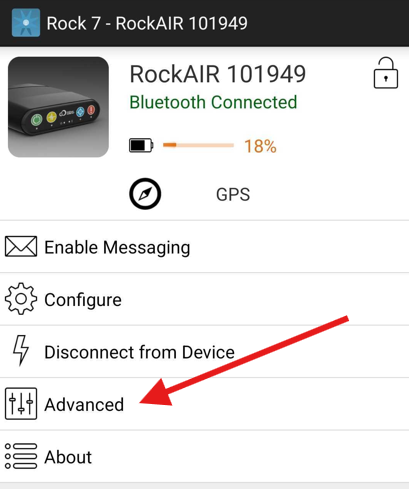
Next, Select the GPRS Setting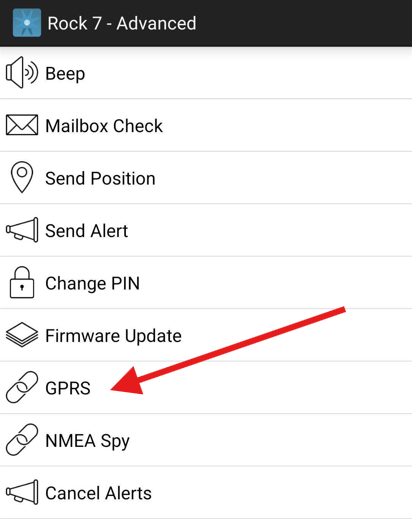
On the next screen, in the "Config" section, make sure you see these values.
Access point name: em
Primary Address: rock7.inbound.tracplus.com
Primary Port: 11009
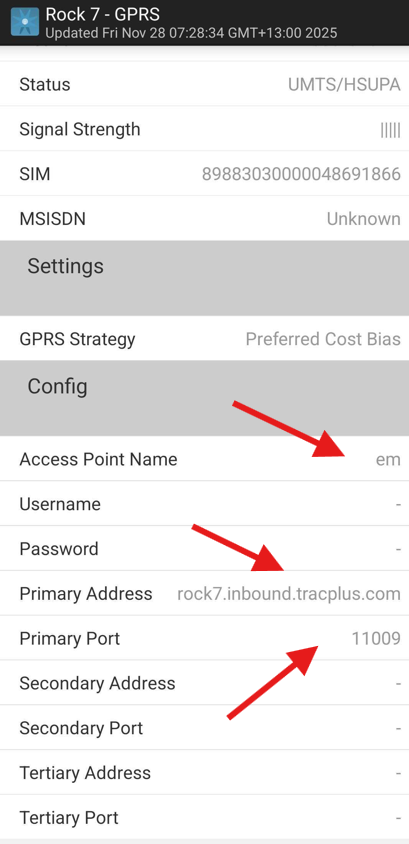
If you do not see this information, make sure that you change it to the correct details, or you will not receive cellular tracking.