
Give Users access to your organisation's assets by inviting them to TracPlus Cloud.
Administrators only. Only users with the Administrator role can invite people. If you can't see Invite User, ask your organisation's administrator.
If a user who you are inviting has already been added to an existing organisation in TracPlus Cloud then they will not get another invite. Instead, your organisation will be automatically added to Organisation Switcher dropdown menu located on the top-left corner (near the TracPlus icon).
If they are not able to view the organisation after you have added them, then request that they refresh the page which should make the organisation appear. If there are any issues with access after sending the invite, then please get in touch via email.
To navigate to the Settings section, click on the Settings icon on the lefthand side of the screen.
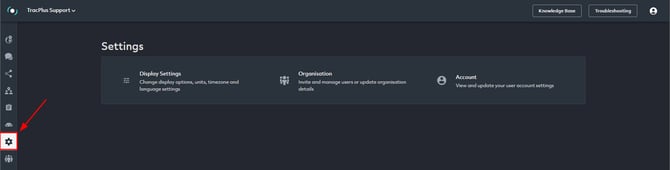
Inviting users to your organisation
To invite users to an organisation please follow the steps given below:
- Navigate to the Settings section on the lefthand side of the screen.
- Go to Organisation > Invite User
Note: If you don't have Administrator privileges, you will not be able to see the Invite User section. - Enter the email address and name of the person you would like to invite to your organisation.
- Select the role you would like the new user to have from the dropdown bar. i.e. View Only or Administrator.
- Click “Send Invitation”.
Choose a role
| Role | What they can do |
|---|---|
| View Only | See assets, positions and history. [Can't change settings, assets or users.] |
| Administrator | Everything View Only can do, plus manage assets, users, contacts and organisation settings. |
If you are an Administrator and would like to learn more: Guide for Administrator users in TracPlus Cloud

New to TracPlus Cloud:
They'll receive an email with a link to set up an account.
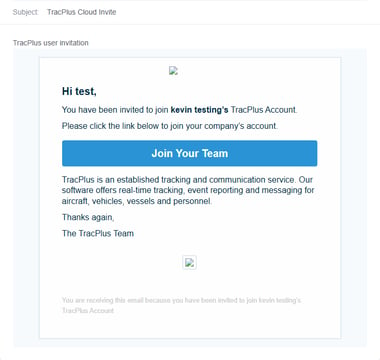
Already a TracPlus Cloud user (in another organisation):
Your organisation is added to their account straight away, and they'll receive an email to let them know. They can switch to it using the Organisation Switcher in the top-left corner. If it doesn't appear, they should refresh the page.
Troubleshooting: The invitation email hasn't arrived:
- Ask them to check their spam or junk folder
- You sent it to the wrong email address: Cancel the pending invitation
- User already exists error: That person is already a member of your organisation
If you have any further questions or require assistance, please don’t hesitate to contact us via email at support@tracplus.com